
Windows 11 Pro:
work smarter, simplify management and boost security.
Windows 11 Pro brings productivity, management and security together in a single platform, giving employees a fast, familiar user experience while providing IT with greater control over devices, updates and data. Copilot+ PCs add a new generation of AI capabilities, with processing handled locally on the device.
Bechtle helps you choose the approach that best fits your people, IT environment and business goals, whether you’re refreshing existing devices, introducing AI into the workplace or looking for a simpler way to manage your device estate.
Why Windows 11 Pro?
The modern workplace should help employees do their best work without adding complexity for IT. Windows 11 Pro brings productivity, centralised management and security together in a single platform, making it easier to introduce new capabilities in a controlled way while continuing to build on the Microsoft environment you already rely on.
Get more out of every working day.
Windows 11 Pro combines a familiar user experience with tools that help employees stay organised and focused throughout the day. Features such as Snap Layouts make it easy to organise multiple windows, while separate desktops create dedicated spaces for different projects and tasks. Improved search helps users find files, settings and information more quickly.
On Copilot+ PCs, additional AI capabilities help streamline everyday work. Click to Do suggests relevant actions based on the text and images displayed on screen, while enhanced search helps employees locate files using natural language, even when they can’t remember the file name. The result is less time spent searching, switching between tasks and organising information.
Copilot+ PCs – On-device AI processing.
Copilot+ PCs combine a CPU, GPU and NPU to handle AI workloads more efficiently. Purpose-built for AI tasks, the NPU processes supported functions locally on the device, delivering fast performance while reducing the need to send every task to the cloud.
Copilot+ PCs also provide a strong foundation for Microsoft 365 Copilot. Integrated across Word, Excel, PowerPoint, Outlook and Teams, Microsoft 365 Copilot supports users in their day-to-day work. It can help create, analyse and summarise content, while the combination of Windows 11 Pro and Copilot+ PCs brings together on-device AI and cloud-based AI in a single working environment.

Reduce the burden on IT.
Windows 11 Pro integrates with management solutions such as Microsoft Intune, Windows Autopilot, Windows Autopatch and Hotpatch, making it easier to provision devices remotely, apply policies centrally and automate much of the update process. New employees can get up and running quickly with a device that automatically configures itself according to company policies after sign-in.
Day-to-day management becomes simpler too, with tools designed to minimise disruption and reduce routine administration. Hotpatch enables supported security updates to be installed with fewer restarts, while Quick Machine Recovery can resolve certain boot issues remotely. As a result, IT teams spend less time on repetitive management tasks and more time improving the digital workplace.
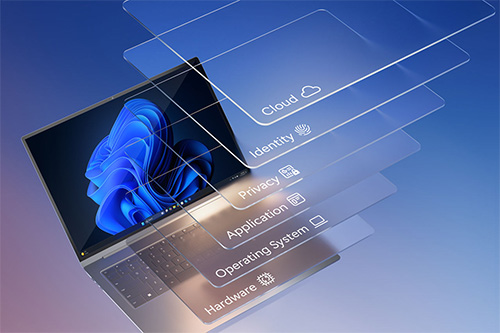
Windows 11 Pro is secure by design and secure by default, with security built into the platform from the ground up. Technologies such as TPM 2.0, Secure Boot, BitLocker and Windows Hello for Business form part of that foundation, helping to provide additional protection for sensitive data, credentials and encryption keys on modern devices.
Security extends from the chip to the cloud. Microsoft Intune and Microsoft Entra ID make it possible to manage access and security policies centrally, while App Control for Business gives organisations greater control over which applications can run. Microsoft Defender helps protect against malware, phishing and other cyber threats. Together, these capabilities embed security throughout the device, the operating system and the way your environment is managed.
Windows 11 Pro provides the foundation for the modern Microsoft workplace, with Microsoft 365 delivering the applications and cloud services employees rely on every day to collaborate and stay productive. Microsoft 365 Copilot adds AI-powered assistance directly within those familiar applications, while Copilot+ PCs bring AI processing to the device itself.
Together, these technologies make it easier to introduce new capabilities in a controlled and manageable way. IT can centrally manage devices, identities and policies, while employees continue working in a familiar environment with new ways to find information, create content and collaborate.
Not every employee uses a PC in the same way. The needs of a mobile consultant differ significantly from those of a designer, data analyst or field service professional, whether in terms of battery life, portability or performance. Requirements for connectivity, security and AI capabilities vary just as much from one role to another.
Bechtle helps match user profiles with the devices best suited to their needs, taking into account everything from specifications and lifecycle requirements to management, accessories, services and compatibility with your existing IT environment.
Explore Windows 11 Pro solutions from Dell, HP, Lenovo and Microsoft Surface:




Making the move to Windows 11 as part of your workplace strategy.
Still running Windows 10 or managing a mix of device generations? A structured migration remains an important step towards a more modern workplace. It also provides an opportunity to assess which devices are still fit for purpose, identify ways to simplify management and determine which employees would benefit most from a Copilot+ PC.
Bechtle can support every stage of the journey, from hardware and application assessments to readiness checks, phased deployment planning, provisioning and the secure retirement or redeployment of existing devices. The result is a migration strategy that supports broader goals around productivity, security and IT management.
Windows 11 system requirements.
The minimum system requirements for Windows 11 are higher than those for Windows 10. To be secure-by-default, devices must include a TPM 2.0 chip and UEFI Secure Boot firmware. System compatibility can be assessed using dedicated software tools. These are the main differences in hardware requirements between Windows 11 and Windows 10.
Windows 11
Windows 10 (64-bit)
64-bit, 1 GHz+, min. 2 cores of SoC
64-bit, 1 GHz 1 core of SoC
4 GB+
2 GB+
64 GB+
20 GB+
UEFI Secure Boot
UEFI
TPM 2.0
TPM 1.2
DirectX 12+ with WDDM 2.0 drivers
DirectX 9+ with WDDM 1.0 drivers
HD 720p
800 x 600
Building a modern Windows workplace together.
A successful workplace strategy starts with understanding how your people work. Our workspace experts assess your current environment, user profiles and business objectives, helping you make the right choices around devices, configuration, deployment, adoption and ongoing management.
Looking to understand how Windows 11 Pro and Copilot+ PCs could support your organisation? Get in touch for a consultation.